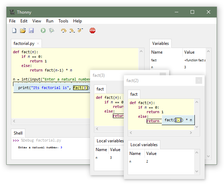
Thonny is a simple Python IDE with features useful for learning programming. It comes with a debugger which is able to visualize all the conceptual steps taken to run a Python program (executing statements, evaluating expressions, maintaining the call stack). There is a GUI for installing 3rd party packages and special mode for learning about references. See the homepage for more information, screenshots and a walk-through video.
Have it
$ nami install thonny
Or one line in your user.nami or a computer's computer.nami: - thonny. An older one, 4.1: - thonny: 4.1 (its newest, 4.1.7). Every version it has had: nami versions thonny, or pick one in the window. Apps, in the docs